Saturday, November 12, 2011

Skip or bypass Rapidshare, Megaupload Waiting time


Yes, you are reading it correctly, its not a prank or joke, now you can easily avoid the waiting time or usually we say time limit when you download as a free user from the file sharing services such as rapidshare, megaupload, deposifiles, hotfile. Normally you have to wait for 20-60 minutes to download the second file after downloading the first one. They implement ways to invite users to purchase a premium service. But this way of limiting Free download limit and asking free users to wait for long time to start another download can be annoying one.
Bypass Download Limit  in rapidshare, hotfile, megaupload

Download Youtube, Google Videos and other Videos Free


As we all know Youtube has a very large database of videos that we watch online. Once I was asked by a friend of mine whether we can download the youtube videos for viewing it offline. There are many softwares out there using which you can easilydownload youtube videos.
Download Youtube videos for free tips
In this post I am going to cover most of the methods to download free youtube videos.
Tips 1: Here is a simple trick to download youtube videos in any quality instantly by running a Java Script.

Download Regular Quality Youtube Video Direct Links [RQ]

javascript:window.location.href = 'http://youtube.com/get_video?video_id=' + yt.getConfig('SWF_ARGS')['video_id'] + "&l=" + yt.getConfig('SWF_ARGS')['l'] + "&sk=" + yt.getConfig('SWF_ARGS')['sk'] + '&t=' + yt.getConfig('SWF_ARGS')['t'];

Download High Quality Youtube Video Direct Links [HQ]

javascript:window.location.href = 'http://youtube.com/get_video?video_id=' + yt.getConfig('SWF_ARGS')['video_id'] + "&fmt=18&l=" + yt.getConfig('SWF_ARGS')['l'] + "&sk=" + yt.getConfig('SWF_ARGS')['sk'] + '&t=' + yt.getConfig('SWF_ARGS')['t'];

Download High Definition Youtube Videos Direct Links [HD]

javascript:window.location.href = 'http://youtube.com/get_video?video_id=' + yt.getConfig('SWF_ARGS')['video_id'] + "&fmt=22&l=" + yt.getConfig('SWF_ARGS')['l'] + "&sk=" + yt.getConfig('SWF_ARGS')['sk'] + '&t=' + yt.getConfig('SWF_ARGS')['t'];

How to use the script or where to paste this java script?

  1. Open any Youtube Video which you want to download.
  2. Just copy the whole script (according to Quality Needed) and paste it on the address bar of the browser where the video is open.
  3. Now Press Enter Key and Download of that yotube video will start instantly.
Download Youtube videos for free tips
Note: If you watch many videos and want to download each of those videos, than you don’t need to always copy the above script. Just Drag them to your Bookmarks Toolbar or right click on the link and save as Bookmark.
Check Find high quality Youtube Videos post to learn an easy method of easilygetting good quality youtube videos
Tips 2:
This method shows a secret way of download youtube videos. Mostly when youwatch videos online, these are stored in the Temporary folder.
You just need to find out what this folder is, where its located and you can copy that file onto any other location.
For Firefox browser: Look at for files with big size usually in xxxxkbs
C:\Documents and Settings\User_name\Local Settings\Application Data\Mozilla\Firefox\Profiles\xxxxx.default\Cache
For Internet Explorer: Look at for files with big size usually in xxxxkbs
C:\Documents and Settings\User_name\Local Settings\Temp
Tipss 3: Download Youtube Videos Using third party softwares
1. Install this best Firefox Plugin/extention Download Helper to download almost any videos like Youtube, Google videos, zshare, veoh, dailymotion, MySpace, Porkolt, iFilm and many others
Download download Helper
2. Using the new latest version of Internet Download Manager(IDM), you can download videos automatically from any websites. Check below screenDownload videos free using Internet Download Manager

Offline Gmail to browse gmail from computer by downloading the whole gmail


Offline Gmail to access gmail from computer

Getting a Google Wave invitation – free ways and methods to get google wave account


Ways of Getting free google wave invitation
Lets begin with a small description of what actually a Google wave is.
Google Wave is an online tool for real-time communication and collaboration. A wave can be both a conversation and a document where people can discuss andwork together using richly formatted text, photos, videos, maps, and more.
A wave is a conversation with multiple participants — participants are people added to a wave to discuss and collaborate on its content. Participants can reply any time and anywhere within a wave, and they can edit content and add more participants as a wave develops. It’s also possible to rewind waves with the playback functionality, to see what happened, and when.
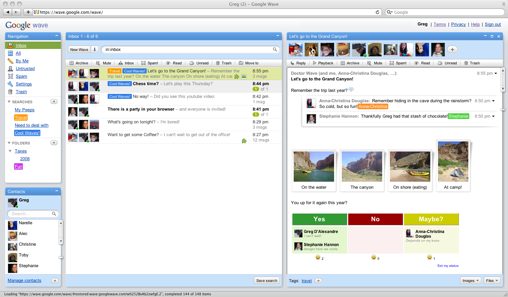
Below is the screenshot of Google wave main page after receiving an invitation and logging in.
Google wave login page after getting invitation
So, If you have a gmail account or orkut account, its not enough to get a google wave account. Since google wave is a new product of google, they offer account only to limited members. Its a bit hard to get google wave account membership though it is free. There are various ways and methods to get google wave account and i am going to highlight it here.
Method 1: Sign up for Google Wave Account by filling the request form
Directly signup at google wave by sending a request to Google Wave team to get an open invitation. You need to fill a request form. Visit request form
Method 2: Ask Google wave users to send you an invitation.
Remember when Gmail was introduced, a person need to get an invitation to open a gmail account. That’s the same case with Google Wave. You can ask any google wave user to send you a invitation. In this way you can easily join google wave.
Method 3: Getting Unlimited Google wave accounts
Invite others after getting unlimitted google wave accounts
Yes, that’s right. Once you hold a google wave account, you can have unlimited google wave accounts and can invite others to google wave.
To apply this trick you will need at least One Google Wave Account and at least One Google Wave Invitation left to invite others.
First, create your entirely new mail account in Gmail.com. Then log in to your Google Wave account.
Click Invite Others to Google Wave and write your new Gmail address at Enter an Email Address Box.
Login to your new Gmail account that you’ve just created and accept the Invitation. You will be redirected to your New Google Wave Account from where you can send further more invitations.
Now u can see 8 Invitations left in your new Google Wave Account. You can keep inviting 7 people. When you have only one Invitations left follow the whole method again, i.e. create new Gmail account and invite it.

Tracing a website using command prompt – hacking tip


Tracing or Routing a website using command prompt. This tip is only meant for educational purpose. I mainly use this trick to find out the hosting provider where a particular domain is hosted.
Follow the below steps:
1.   Start->Run->CMD  ie; open Command prompt
2.  Type the following command and press enter.
tracert www.websitename.com
in the above command, enter the desired website name.
Once you press enter, it tell you where a particular domain is hosted, Location, Country and some details of that domain.
Disclaimer: I am not responsible for this trick if this is used in a wrong way. I didn’t invent this method rather I myself found it somewhere else. Do not use this for Hacking purpose.

Mozilla Firefox Mobile WAP Browser – Coming soon for Mobile Phone Download

Mozilla firefox has launched Mobile version browser to download as beta for Nokia

Gmail Drive guide to use Gmail space as online storage drive hack


Free Gmail drive help to use gmail space as external drive
Gmail is really famous among users of all the email clients available on the web and that is not because it has a cool interface rather it is famous for its reliability and huge space which includes storage space of 6000 megabytes  and increasing. Google doesn’t stop here and recently Google announced that users can now buy more online storage for Google services just by paying a little amount. So why not use this online storage space and use it externally probably as a network drive or one of your own computer hard drives.
Use Google Storage Space as Google Drive
I am going to show different methods by which your can use your Gmail account space as your external hard drive that too free. You will be able to download (or should I say copy) attachments from your Gmail account to your computer just as you would do from a drive on your computer. You can also use this space to upload content direct from your computer and save it online in your Gmail account.
1. GMAIL DRIVE
Gmail Drive Guide free
GMail Drive is a Shell Namespace Extension that creates a virtual filesystem around your Google Mail account, allowing you to use Gmail as a storage medium.
GMail Drive creates a virtual filesystem on top of your Google Gmail account and enables you to save and retrieve files stored on your Gmail account directly from inside Windows Explorer. GMail Drive literally adds a new drive to your computer under the My Computer folder, where you can create new folders, copy and drag’n'drop files to.
With GMail Drive you can easily copy files to your Google Mail Account and retrieve them again.
When you create a new file using GMail Drive, it generates an e-mail and posts it to your account. The e-mail appears in your normal Inbox folder, and the file is attached as an e-mail attachment. GMail Drive periodically checks your mail account (using the Gmail search function) to see if new files have arrived and to rebuild the directory structures. But basically GMail Drive acts as any other hard-drive installed on your computer.
You can copy files to and from the GMail Drive folder simply by using drag’n'drop like you’re used to with the normal Explorer folders.
Because the Gmail files will clutter up your Inbox folder, you may wish to create a filter in Gmail to automatically move the files (prefixed with the GMAILFS letters in the subject) to your archived mail folder.
Please note that GMail Drive is still an experimental tool. There’s still a number of limitations of the file-system (such as total filename size must be less than 65 characters). Since the tool hooks up with the free Gmail Service provided by Google, changes in the Gmail system may break the tool’s ability to function. I cannot guarantee that files stored in this manner will be accessible in the future.
2. PHP GMAIL DRIVE (PGD)
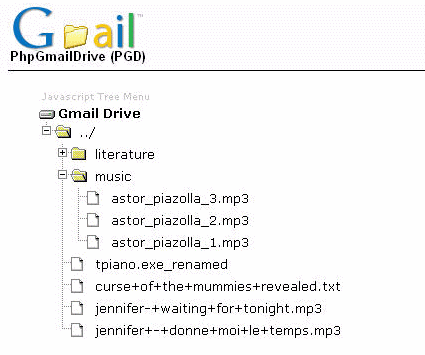
free guide for php gmail drive pgdPhp Gmail Drive is a new type of file sharing utility. Unlike typical file servers (say xDrive) it uses Gmail as backend file server. You can enjoy it simply by hosting a small PHP script in yourweb site without any database. Gmail file space is more than 2GB, so you can imagine you already have such a big space on internet. However, you will require a Gmail account (If you don’t have any Gmail address, go GmailSwap or ask your friends.). PGD automatically connects Gmail server and fetches list of all attached files and generate downloadable links in a tree like view. If you are looking for a file server to upload your music or notes without any hassle, PGD is ideal for you. Technically speaking PGD is wrapper of Gmailer . Thought there is  no need to know hecks of PHP or Gmailer.  Just you have to check that your PHP hosting service provider has curl extension of PHP to handle HTTP/HTTPS traffic.
Features
* Successfully connects to Gmail and only grabs list of Attachments in Gmail messages.
* List of attachments are displayed with inbuilt Javascript engine. You can customize output to any other formats.
* 100% compliant to GMAILFS. So you can upload with Windows Gmail Shell extension or Linux GmailFS utilities..
* Supports Multiple Gmail accounts in the same script .
* Supports all browsers.
* Total size is less than 100 KB.
3. GSPACE
Free Gspace Guide to use gmail as drive