Monday, January 16, 2012

China's Internet Users Cross 500 Million


China's Internet population passed the half billion mark at the end of 2011 after the country added 28 million new users during the second half of the year.


At the end of December, the country had 513 million Internet users, according to a report issued Monday by the China Internet Network Information Center (CNNIC), a non-profit group with ties to the government. This puts the country's total Internet penetration at 38.3 percent, up 4 percent from a year ago. In contrast, the U.S. has a total Internet penetration of 78.2 percent, according to Internet World Stats.
The number of users accessing the Internet from their mobile phones has also grown, reaching 355 million, or more than the entire population of the U.S. Now 69.3 percent of China's Internet users connect to the Internet via their handsets, up from 66.2 percent a year ago.
Users typically use one or more devices to access the Internet, but the percentage of users relying on desktop PCs to link to the Internet has decreased to 73.4 percent, while the percentage of Internet users that access from their notebooks has remained steady at 46.8 percent.
The growth in China's Internet users has slowed in recent years, down to single digit percentage increases every six months. CNNIC's latest report noted that most Chinese people within the 10 to 29 year old age range already use the Internet, but that more work needs to be done in getting older population groups and people less educated to use the Internet.
Instant messaging, search engines, and online music are the most popular Internet applications among Chinese users. But the number of users of China's microblogs, which operate like Twitter, saw the most growth in 2011. Their numbers reached to almost 250 million users, up from 63 million a year ago.
Analysts, however, have said the statistics provided by the CNNIC are inflated. The CNNIC defines users as people, ages 6 and above, who have connected to the Internet in the past six months.

Tuesday, January 10, 2012

Managing Services on Linux with systemd

 You've read all about systemd, the new Linux init daemon. You know what it does, and why. Now it's time to dig in and learn how to make it sit up and beg — or at least start, stop, and get information on services.

Starting and Stopping Services

My earlier piece, "Here We Go Again, Another Linux Init: Intro to systemd" discusses the concepts behind systemd and what it is supposed to do. Now it's time to learn how to use it to control services on our systems. systemd is backwards-compatible with sysvinit and Upstart, so you can try it out by installing it on any Linux that uses sysvinit or Upstart without a lot of extra work. Arch Linux, Debian, and OpenSUSE all include systemd in their software repositories.
A conspicuous omission from distros that support systemd is Ubuntu. There are various reasons given for this, and I don't care because I'm tired of geekfights and just want to get on with things. Another way is to fetch yourself a copy of Fedora 15 or 16, which runs systemd by default.

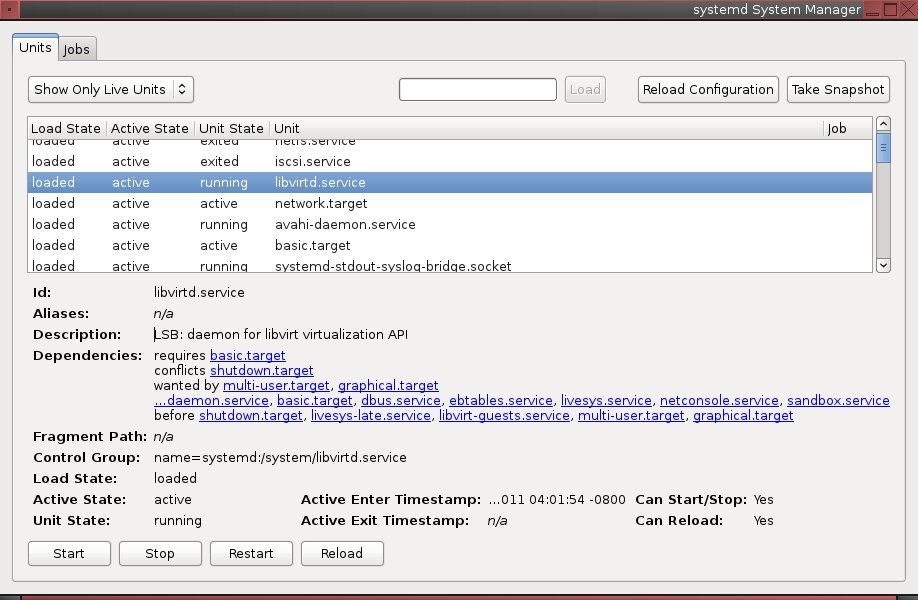
systemadm is a nice graphical systemd manager (figure 1). It's still a baby so it might crash or something, but you can try it by installing the systemd-gtk package on Fedora, the systemd package on Arch, or the systemd-gui for Debian. No, of course distros cannot use consistent package naming, because that is against the rules.
As pretty as systemadm is, let us adjourn to the command line for the rest of this article. Watch the prompts in the examples to see which ones require root privileges. You can see the status of everything systemd controls by running systemctl with no options:
$ systemctl
UNIT                                              LOAD   ACTIVE SUB       JOB DESCRIPTION
proc-sys-fs-binfmt_misc.automount                 loaded active waiting       Arbitrary Executable File Formats File System Aut
sys-devices-pci0...000:00:1b.0-sound-card0.device loaded active plugged       82801I (ICH9 Family) HD Audio Controller
sys-devices-pci0...-0000:05:00.0-net-wlan0.device loaded active plugged       Centrino Wireless-N 1000
How do you see only available services, running or not?
$ systemctl list-units -t service --all
UNIT              LOAD   ACTIVE   SUB   JOB   DESCRIPTION
ceph.service      loaded inactive dead        LSB: Start Ceph distributed filesystem daemons at boot time
chronyd.service   loaded active   running     NTP client/server
cman.service      error  inactive dead        cman.service
These will spit out a whole lot of output, probably a hundred lines or more. Want to see only active services?
$ systemctl list-units -t service
You can check the status of any individual service, such as the cman.service, which has an error flag in the previous example:
$ systemctl status cman.service
cman.service
   Loaded: error (Reason: No such file or directory)
   Active: inactive (dead)

How nice, it tells us what the problem is. Here is what a normal running service looks like, with complete information on the service:
$ systemctl status sshd.service
sshd.service - OpenSSH server daemon
   Loaded: loaded (/lib/systemd/system/sshd.service; enabled)
   Active: active (running) since Thu, 15 Dec 2011 12:11:05 -0800; 2h 26min ago
 Main PID: 2091 (sshd)
   CGroup: name=systemd:/system/sshd.service
      \   2091 /usr/sbin/sshd -D

On Fedora you can still use the old service and chkconfig commands. But why not start learning the new systemd commands? This is how to start a service:
# systemctl start sshd.service
Or use restart to restart a running service. This stops a service:
# systemctl stop sshd.service
Those are in effect only for the current session, so if you want a service to start at boot do this:
# systemctl enable sshd.service
And that's all. No hassling with startup scripts. This disables it from starting at boot:
# systemctl disable sshd.service
You can check to see if a service is already running; 0 means it is currently running and 1 means it is not:
$ systemctl is-enabled sshd.service; echo $? 
enabled
0
You can use systemctl halt, poweroff, or reboot to shutdown or reboot the system. All three send a wall message to users warning that the system is going down.

Processes, cgroups, and Killing

systemd organizes processes with cgroups, and you can see this with the ps command, which has been updated to show cgroups. Run this command to see which service owns which processes:
$ ps xawf -eo pid,user,cgroup,args 
  PID USER     CGROUP                      COMMAND
 1338 root     name=systemd:/user/carla/2       \_ gdm-session-worker [pam/gdm-password]
 1358 carla    name=systemd:/user/carla/2           \_ /bin/sh /etc/xdg/xfce4/xinitrc
 1487 carla    name=systemd:/user/carla/2               \_ /usr/bin/ssh-agent /bin/sh -c exec -l /bin/bash -c "startxfce4"
 1515 carla    name=systemd:/user/carla/2               \_ xscreensaver -no-splash
 1517 carla    name=systemd:/user/carla/2               \_ xfce4-session

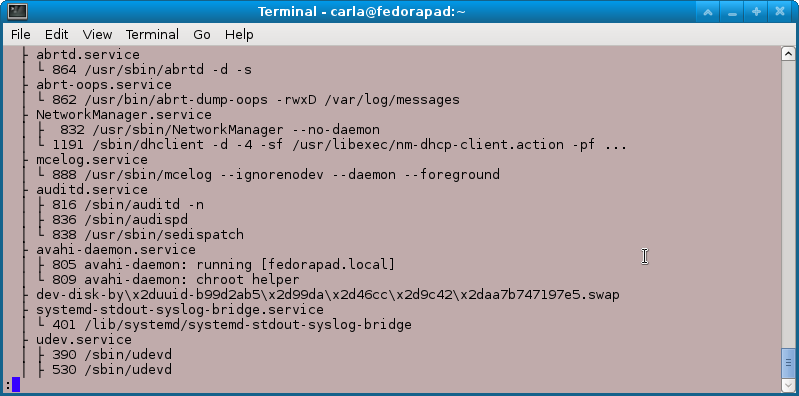
cgroups were introduced into the Linux kernel a few years ago, and they are an interesting mechanism for allocating and limiting kernel resources. In systemd, cgroups are used to corral and manage processes. When new processes are spawned they become members of the parent's cgroup. The cgroup is named for the service it belongs to, and services cannot escape from their cgroups so you always know what service they belong to. When you need to kill a service you can kill the cgroup, and snag all of its processes in one swoop instead of playing find-the-fork-or-renamed-process. Another way to view the process hierarchy is with the system-cgls command, as shown in Figure 2.
Figure 2: Partial output from system-cgls showing process cgroups.

There is my old friend Avahi daemon. So instead of hunting down and killing the two Avahi processes the old-fashioned way, systemd lets me do it in one command:
# systemctl kill avahi-daemon.service
Lennart Poettering, the main author of systemd, has written a series of articles for sysadmins. They're not indexed, so here are links for your convenience. These cover customizing startup services, runlevels, gettys, and everything you need to know to control systemd

How to Craft a Killer Cover Letter for Linux Jobs


You're certified, bona fide, and active in your favorite open source project, but how do you craft the clever cover letter that lands your next Linux job?
If you're lucky, your reputation precedes you and dream job offers land in your in-box every other day. If you're like the rest of us, a well-crafted cover letter can make the difference between getting a phone call, or getting shuffled to the bottom of the resume pile. Before prospective employers look down the list of Linux skills and open source project experience you've laid out on your resume, they'll do a quick read of your cover letter, which is your one chance to make a fabulous first impression.
I've long hated writing cover letters. Once you've written your resume, it's pretty much good to go, with occasional updates or tweaks to highlight skills that would appeal to specific employers. Cover letters, on the other hand, need to be written with a specific employer or position in mind. And knowing that these few paragraphs need to say more than your resume does can be nerve wracking. With a few rules in mind, you can take the torture out of writing and focus on why you are the only logical solution to an employer's high-tech needs.

1. Be Concise

First, the good news: No one wants to read your dissertation. Instead, keep your cover letter brief, yet meaty (like this rule).

2. Be Relevant

Before writing anything, research the company and position for which you are applying. Read the press releases on the official company site, search the web to learn more about what others are saying about the company, and consider how your skill set will be an asset to the employer. Remember that the employer wants to know how you will meet his or her needs, so don't focus on why this job would meet your needs (unless your needs are all about focusing on the needs of your prospective employer).
In her Dice.com article called How to Target A Cover to Get the Manager’s Attention, Leslie Stevens-Huffman explains, "Don't belabor points or regurgitate the information in your resume. Create a short, compelling narrative that proves you understand the company’s needs and describes how you intend to meet them."
Gayle Laakmann McDowell, author of The Google Resume and Cracking the Coding Interview, says that how you discuss your open source work depends on the type of job for which you are applying. "If you're applying for a coding role, you should focus on the code you wrote (that is, the features)," she says. "If you're applying for a Program Management job, you should focus on the leadership aspects."
Instead of going into detail in the cover letter, you could put this open source experience under a Projects section of your resume or under Work Experience, particularly if you've spent a substantial amount of time on an open source project. "Additionally, providing a link to your GitHub page or another page where a resume screener can learn more about your coding experience is always useful," she adds.
"As a hiring manager for software engineers, I'm always happy to see that a candidate is a contributor to open source projects," says Jenson Crawford, Director of Engineering at Fetch Technologies. "Participation in open source projects tells me that technology is a passion for the candidate and it's not just a job. It also shows that the candidate is interested in making things better than they were found," he says.
Crawford agrees with McDowell when it comes to including open source experience on a cover letter. "If a candidate's open source contributions can demonstrate that the candidate has the needed qualifications or experience, include the contributions to make the connection to the hiring company's needs," he explains. "If there isn't a direct connection between the candidate's open source contributions and the qualifications listed in the job posting, or if the candidate is applying to a company without a specific job posting, include information about the contributions in a general way. Perhaps something like: I'm passionate about technology and contribute the open source projects X, Y, Z."
Let's say you are applying to be a web developer and you're interviewing for a company that requires Drupal experience. Here's your opportunity to show that you've researched the company and have the exact skills they seek. The job description says:
Experience with and a high degree of competency in Drupal is a must, including development of modules and themes, and familiarity with the Drupal API, hook system, form API, etc.
So your response to this job requirement might be something like, "In addition to developing more than two dozen Drupal modules and themes for my current employer, I'm also active in the Drupal community and recently gave a DrupalCon Lightning talk about submitting patches." Now the prospective employer knows that your resume includes required skills, but you've also added something more personal about your specific skills, which brings us to the next rule.

3. Be Professional, but Personal

Showing your personality in a resume is no easy feat, so be sure to do it in your cover letter. "Not only do you want to show that you're a good fit for the position, but you also want the reader to like you," explains Kim Isaacs, Monster Resume Expert. "Appropriate use of humor, combined with a friendly and professional tone, can help endear you to the hiring manager." Still, keep in mind that the cover letter is a formal document and not an email to your BFF, so keep the tone professional, too.

4. Be Proofed and Polished

If you're sloppy on your cover letter, employers can safely assume you'll be sloppy in your code or work habits. In addition to spell checking your letter, consider having a friend or colleague proofread it, too. Reread the job description and your letter — have you shown that you understand the position for which you are applying and that you're the ideal candidate for the role?
You have as long as you need to proof the cover letter before sending it in, so be sure that it doesn't make a trip to the circular file because it's sloppy.
If you're not quite ready to apply for that great Linux job, consider ways to get involved in the community atevents or with Linux training opportunities.
What other advice do you have for crafting clever cover letters? Share your success stories (or horror stories) in the comments below
============================Rikki Endsley================

Saturday, January 7, 2012

Mail Transport Protocols


Mail delivery from a client application to the server, and from an originating server to the destination server, is handled by the Simple Mail Transfer Protocol (SMTP).


SMTP:-

The primary purpose of SMTP is to transfer email between mail servers. However, it is critical for email clients as well. To send email, the client sends the message to an outgoing mail server, which in turn contacts the destination mail server for delivery. For this reason, it is necessary to specify an SMTP server when configuring an email client.

Under Red Hat Enterprise Linux, a user can configure an SMTP server on the local machine to handle mail delivery. However, it is also possible to configure remote SMTP servers for outgoing mail.
One important point to make about the SMTP protocol is that it does not require authentication. This allows anyone on the Internet to send email to anyone else or even to large groups of people. It is this characteristic of SMTP that makes junk email or spam possible. Modern SMTP servers attempt to minimize this behavior by allowing only known hosts access to the SMTP server. Those servers that do not impose such restrictions are called open relay servers.
By default, Sendmail (/usr/sbin/sendmail) is the default SMTP program under Red Hat Enterprise Linux. However, a simpler mail server application called Postfix (/usr/sbin/postfix) is also available.

What is Email Protocols


Today, email is delivered using a client/server architecture. An email message is created using a mail client program. This program then sends the message to a server. The server then forwards the message to the recipient's email server, where the message is then supplied to the recipient's email client.
To enable this process, a variety of standard network protocols allow different machines, often running different operating systems and using different email programs, to send and receive email.
The following protocols discussed are the most commonly used in the transfer of email.

Why Use a Linux Mail Server

                       Why use a Linux mail server? Check out the some of the advantages below.
  • Supports POP3, IMAP and Web mail access. These are standard services that ideally should be available in any mail system for flexible email access.
  • Is extremely fast, reliable and scalable. Linux performs well and its uptime is very, very good.
  • Does not require expensive hardware. Thanks to its fast and efficient services, expensive high end hardware is not necessary.
  • Is very secured. The Linux operating system is very difficult to exploit. TheNational Security Agency even contributed to allow Linux to support even stronger levels of security.
  • Has a powerful anti-spam filter. SpamAssassin uses a wide variety of local and network tests to identify spam signatures.
  • Has an effective and regularly updated anti-virus. The open source nature of Clam Antivirus allows it to respond to new viruses even faster than commercial antivirus softwares.
  • Has small to zero (as in free) software cost depending on your support needs. Depending on your support needs, you have the option of using a community supported Linux or a company supported one.
  • Works with Microsoft Active Directory. You can integrate Microsoft Active Directory user accounts and distribution list into your Linux mail server to simplify administration.

Friday, January 6, 2012

Worm steals 45,000 Facebook passwords, researchers say


More malware is worming its way onto social networks.
  A computer worm has stolen 45,000 login credentials from Facebook, security experts have warned.
The data is believed to have been taken largely from Facebook accounts in the UK and France, according to security firm Seculert.
The culprit is a well-known piece of malware - dubbed Ramnit - which has been around since April 2010 and has previously stolen banking details.
Facebook told the BBC that it was looking into the issue.
The latest iteration of the worm was discovered in the labs of security firm Seculert.
"We suspect that the attackers behind Ramnit are using the stolen credentials to login to victims' Facebook accounts and to transmit malicious links to their friends, thereby magnifying the malware's spread even further," said the researchers on the firm's blog.

"In addition, cybercriminals are taking advantage of the fact that users tend to use the same password in various web-based services to gain remote access to corporate networks," it added.

'Viral power'

Social networks offer rich pickings for hackers because of the huge amount of personal data that is stored on them. Increasingly malware is being updated for the social networking age.

"It appears that sophisticated hackers are now experimenting with replacing the old-school email worms with more up-to-date social network worms. As demonstrated by the 45,000 compromised Facebook subscribers, the viral power of social networks can be manipulated to cause considerable damage to individuals and institutions when it is in the wrong hands," said Seculert.

According to Seculert, 800,000 machines were infected with Ramnit from September to the end of December 2011.

Microsoft's Malware Protection Center (MMPC) described Ramnit as "a multi-component malware family which infects Windows executable as well as HTML files... stealing sensitive information such as stored FTP credentials and browser cookies".

In July 2011 a Symantec report estimated that Ramnit worm variants accounted for 17.3% of all new malicious software infections.

For Facebook users concerned that they have been affected by the worm, the advice is to run anti-virus software.

"It won't necessarily be obvious that you have been attacked. The worm is stealing passwords so it is not going to announce itself," said Graham Cluley, senior security consultant at Sophos.