Monday, June 25, 2012

Change or Reset Windows Password from a Ubuntu Live CD

If you can’t log in even after trying your twelve passwords, or you’ve inherited a computer complete with password-protected profiles, worry not – you don’t have to do a fresh install of Windows. We’ll show you how to change or reset your Windows password from a Ubuntu Live CD.
This method works for all of the NT-based version of Windows – anything from Windows 2000 and later, basically. And yes, that includes Windows 7.
Note: If you have files on your hard disk encrypted using built-in Windows encryption, they may not be available after changing the Windows password using this method. Exercise caution if you have important encrypted files.
You’ll need a Ubuntu 9.10 Live CD, or a bootable Ubuntu 9.10 Flash Drive. If you don’t have one, or have forgotten how to boot from the flash drive, check out our article on creating a bootable Ubuntu 9.10 flash drive.
The program that lets us manipulate Windows passwords is calledchntpw. The steps to install it are different in 32-bit and 64-bit versions of Ubuntu.

Installation: 32-bit
Open up Synaptic Package Manager by clicking on System at the top of the screen, expanding the Administration section, and clicking on Synaptic Package Manager.


chntpw is found in the universe repository. Repositories are a way for Ubuntu to group software together so that users are able to choose if they want to use only completely open source software maintained by Ubuntu developers, or branch out and use software with different licenses and maintainers.
To enable software from the universe repository, click on Settings > Repositories in the Synaptic window.

Add a checkmark beside the box labeled “Community-maintained Open Source software (universe)” and then click close.


 When you change the repositories you are selecting software from, you have to reload the list of available software. In the main Synaptic window, click on the Reload button.


The software lists will be downloaded.


Once downloaded, Synaptic must rebuild its search index. The label over the text field by the Search button will read “Rebuilding search index.” When it reads “Quick search,” type chntpw in the text field. The package will show up in the list.


Click on the checkbox near the chntpw name. Click on Mark for Installation.


chntpw won’t actually be installed until you apply the changes you’ve made, so click on the Apply button in the Synaptic window now.

You will be prompted to accept the changes. Click Apply.

The changes should be applied quickly. When they’re done, click Close.

chntpw is now installed! You can close Synaptic Package Manager. Skip to the section titled Using chntpw to reset your password.


Installation: 64-bit
The version of chntpw available in Ubuntu’s universe repository will not work properly on a 64-bit machine. Fortunately, a patched version exists in Debian’s Unstable branch, so let’s download it from there and install it manually.
Open Firefox. Whether it’s your preferred browser or not, it’s very readily accessible in the Ubuntu Live CD environment, so it will be the easiest to use. There’s a shortcut to Firefox in the top panel.

Navigate tohttp://packages.debian.org/sid/amd64/chntpw/download and download the latest version of chntpw for 64-bit machines.
Note: In most cases it would be best to add the Debian Unstable branch to a package manager, but since the Live CD environment will revert to its original state once you reboot, it’ll be faster to just download the .deb file.

 Save the .deb file to the default location.


You can close Firefox if desired. Open a terminal window by clicking on Applications at the top-left of the screen, expanding the Accessories folder, and clicking on Terminal.


In the terminal window, enter the following text, hitting enter after each line:


cd Downloads sudo dpkg –i chntpw*


chntpw will now be installed.
Using chntpw to reset your password
Before running chntpw, you will have to mount the hard drive that contains your Windows installation. In most cases, Ubuntu 9.10 makes this simple.
Click on Places at the top-left of the screen. If your Windows driveis easily identifiable – usually by its size – then left click on it.


If it is not obvious, then click on Computer and check out each hard drive until you find the correct one.

The correct hard drive will have the WINDOWS folder in it. When you find it, make a note of the drive’s label that appears in the menu bar of the file browser.

If you don’t already have one open, start a terminal window by going to Applications > Accessories > Terminal.

In the terminal window, enter the commands
cd /media
ls
pressing enter after each line. You should see one or more strings of text appear; one of those strings should correspond with the string that appeared in the title bar of the file browser earlier.
Change to that directory by entering the command
cd
Since the hard drive label will be very annoying to type in, you can use a shortcut by typing in the first few letters or numbers of the drive label (capitalization matters) and pressing the Tab key. It will automatically complete the rest of the string (if those first few letters or numbers are unique).

We want to switch to a certain Windows directory. Enter the command:


cd WINDOWS/system32/config/
Again, you can use tab-completion to speed up entering this command.

To change or reset the administrator password, enter:


sudo chntpw SAM
SAM is the file that contains your Windows registry. You will see some text appear, including a list of all of the users on your system.


 At the bottom of the terminal window, you should see a prompt that begins with “User Edit Menu:” and offers four choices. We recommend that you clear the password to blank (you can always set a new password in Windows once you log in). To do this, enter “1” and then “y” to confirm.

If you would like to change the password instead, enter “2”, then your desired password, and finally “y” to confirm. 

If you would like to reset or change the password of a user other than the administrator, enter:


sudo chntpw –u SAM


From here, you can follow the same steps as before: enter “1” to reset the password to blank, or “2” to change it to a value you provide.


And that’s it!

Conclusion
chntpw is a very useful utility provided for free by the open source community. It may make you think twice about how secure the Windows login system is, but knowing how to use chntpw can save your tail if your memory fails you two or eight times!

How To Create A Bootable USB Ubuntu Drive


Now there are loads of tools to use for this purpose. I have already covered the Unetbootin tool in my article “Install Linux on a USB drive with Unetbootin.” This time around we are going to do the same trick with a tool that comes pre-installed on any modern Ubuntu distribution. It’s all graphical interface and all easy going.

What you will need

* A USB drive with at least 700 MB in size.
* Either an ISO image or the Ubuntu Live CD

And a little bit of time. If you don’t have either the ISO image or the CD you can just download a fresh copy from the Ubuntu site.

Once you have everything you need, you are ready to go.

Starting The Tool


You will find the USB creator in the Administration sub-menu of the System menu on the GNOME desktop. The entry you are looking for is called “USB Startup Disk Creator”. Click that to open up the main window (see Figure 1).

As you can see (in Figure 1) there is neither an image or a CD listed. You either have to insert your Ubuntu CD or, if you’re using a downloaded image, click the Other button and navigate to where you’ve saed your image file.

When you insert your CD it will be automatically detected by the system and listed in the USB Startup Disk window. When this happens everything that is greyed out in Figure 1 will be at your service.

You will notice the only option available is for saving documents
and settings. If your USB drive has enough extra space you can designate a portion of that drive for this purpose. With this feature you can effectively have a portable version of Linux that is far more than just a “startup disk”.

Creating The Disk 

When you have selected your image to use and configured your free space you are ready to go. Click the Make Startup Disk button and the main windo will be dismissed. During the creation process you will see a progress window (see Figure 2) that will let you know how much is done and what is happening. The phases of this creation are:

    * Copying Files
    * Creating persistence file
    * Making persistence file system

Once all three phases are complete you will get a dialog window telling you installation is complete and you can now reboot your machine with the USB drive. Of course when you boot a machine with this device it has to be able to boot from a USB device. Most modern machine can do that so it shouldn’t be an issue.

Final Thoughts

As far as tools of this nature, the Ubuntu USB disk creator tool is one of the easiest and most reliable. It’s not the most flexible; but for what it does, you can’t beat it. If you’re looking to have a portable Ubuntu distribution you can carry with you, make use of this user-friendly tool. 

Top 10 Most Infamous Black Hat Hackers of All Time

In the world of information technology, black hat hackers (also known as crackers or cyber-criminals) are known as the bad guys or villains. Most of them break into computers or networks without authorization to steal Money and classified and sensitive information, while others are doing it simply for the challenge or the thrill of hacking. To accomplish their sinister work, crackers often create malware (malicious software) like viruses and worms to gain control of computer systems.


I have gathered here a list of ten of the most popular cyber-criminals the world has ever known. These evil geniuses were involved in high profile hacking that possibly caused millions, if not billions of dollars in total damages. However, some of them have now turned to the good side and are using their talents for the benefit of mankind.


Without further delay, here are the top 10 most infamous black hat hackers of all time:


10. Jonathan James
At the age of 16, Jonathan James (also known as c0mrade) became the first juvenile imprisoned for cybercrime in the United States. James carried out a series of intrusions into various systems including the computers of the Defense Threat Reduction Agency (DTRA) of the US Department of Defense. James had installed an unauthorized backdoor in a computer server in Dulles, Virginia that he used to install a sniffer allowing him to intercept over three thousand messages passing to and from DTRA employees while collecting countless usernames and passwords. This intrusion caused NASA to shut down its computers for three weeks costing them $41,000 to check and secure their systems. Jonathan James committed suicide in 2008.


9. Kevin Poulsen
Kevin Poulsen (also known as Dark Dante) is a notorious black hat hacker in the 1980s. One of his popular hacks was a takeover of all of the telephone lines for Los Angeles radio station KIIS-FM, assuring that he would be the 102nd caller, and the likely winner of a brand new Porsche 944. Poulsen went underground as a fugitive when the FBI started pursuing him, but was finally captured in 1991. He pleaded guilty to seven counts of mail, wire and computer fraud, money laundering, obstruction of justice, and for obtaining information on covert businesses run by the FBI. Kevin Poulsen was sentenced to 51 months in prison, which at that time was the longest sentence ever given for cracking. He is now a free man and is a senior editor at Wired News.


8. Albert Gonzalez
Albert Gonzalez is a cyber-criminal accused of masterminding the biggest ATM and Credit Card theft in history. From 2005 through 2007, he and his group have allegedly sold more than 170 million card and ATM numbers. Gonzalez's team used SQL injection techniques to create malware backdoors on several corporate systems in order to launch packet-sniffing (specifically, ARP Spoofing) attacks, which allowed him to steal computer data from internal corporate networks. When he was arrested, authorities seized $1.6 million in cash including $1.1 million in plastic bags placed in a three-foot drum buried in his parents' backyard. Earlier this year, Gonzalez was sentenced to 20 years in federal prison.


7. Michael Calce 
In February 2000, Michael Calce (a.k.a. MafiaBoy) launched a series of highly publicized denial-of-service attacks against large commercial websites. His victims include Yahoo!, Amazon.com, Dell, eBay, and CNN. He hacked Yahoo! when it was still the web's leading search engine causing it to shutdown for about an hour. Calce exploited websites primarily for pride and to establish dominance for himself and his cybergroup named TNT. In 2001, the Montreal Youth Court sentenced him to eight months of open custody, one year of probation, restricted use of the Internet, and a small fine.


6. Markus Hess
Markus Hess is a German hacker in the late 1980s that was recruited by the KGB and was involved in a Cold War computer espionage incident. All the way from Germany, he was able to access computer systems from the Lawrence Berkeley Laboratory (LBL) located in California. By using LBL to “piggyback” to ARPANET and MILNET, Hess attack 400 U.S. military computers including OPTIMIS Database (The Pentagon), Anniston Army Depot, U.S. Air Force (Ramstein Air Base, West Germany), Fort Buckner, Camp Foster (Okinawa, Japan). He went to trial in 1990 and was found guilty of espionage. Hess was sentenced to a one to three year prison sentence but was eventually released on probation.


5. Vladimir Levin
Vladimir Levin is known for his involvement in the attempt to illegally transfer 10.7 million US dollars via Citibank's computers. In 1997, Levin was brought into U.S. custody, and he admitted to only one count of conspiracy to defraud and to stealing $3.7 million. The following year, he was convicted and sentenced to three years in prison, and ordered to pay more than $200,000. Of the stolen $10.7 million, Citibank claimed that only around $400,000 had been recovered. At the moment, Levin is free and now lives in Lithuania.


4. Robert Tappan Morris
Robert Tappan Morris is an 'accidental' black hat hacker infamous for creating the first ever computer worm on the Internet known as Morris Worm. In 1988, he created the worm while he was a graduate student at Cornell University with the original aim of measuring the size of the Internet or counting the number of computers connected to it. The Morris Worm spread rapidly and infected thousands of computers. The cost of possible loss in productivity caused by the worm at each system ranged from $20,000 to more than $530,000 as estimated. Without serving jail time, Morris was sentenced to community service, probation, and a fine of $10,000. He is currently a professor at Massachusetts Institute of Technology (MIT), in the Institute's department of Electrical Engineering and Computer Science.


3. Adrian Lamo
Adrian Lamo is widely known for breaking into a series of high-profile computer networks that include The New York Times, Microsoft, Yahoo!, and MCI WorldCom. In 2002, he added his name to the The New York Times' internal database of expert sources and used LexisNexis account to conduct research on high-profile subjects. The Times filed a complaint, and a warrant for Lamo's arrest was issued, followed by a 15-month investigation by federal prosecutors in New York. After several days in hiding, he surrendered to the US Marshals, and then to the FBI. Lamo was ordered to pay around $65,000 in damages and was sentenced to six months house arrest at his parents' home, plus two years probation. In June 2010, Lamo disclosed the name of Bradley Manning to U.S. Army authorities as the source of the July 12, 2007 Baghdad airstrike video leak to Wikileaks. At present, he is working as a threat analyst and donates his time and skills to a Sacramento-based nonprofit organization.


2. Gary McKinnon
Gary McKinnon has been accused of what one US prosecutor claims is the "biggest military computer hack of all time". Between February 2001 and March 2002, he reportedly exploited 97 United States military, Department of Defense, and NASA computers. McKinnon allegedly deleted critical files from operating systems that shut down the US Army’s Military District of Washington network of 2,000 computers for 24 hours. He supposedly deleted US Navy Weapons logs, causing a naval base's network of 300 computers unusable after the September 11th terrorist attacks. McKinnon is also charged with copying of sensitive data, account files, and passwords onto his own computer. He expresses that he was only looking for evidence of free energy suppression, a cover-up of UFO activity, and other technologies that may be useful to the public. At present, McKinnon is awaiting extradition to the United States.


1. Kevin Mitnick 
Kevin Mitnick was once considered as the most wanted computer criminal in United States history. He was involved in a highly publicized pursuit by authorities that his misadventures were depicted in two hacker films: Takedown (a.k.a. Hackers 2) and Freedom Downtime. While he was a fugitive, he cracked dozens of computer networks and copied valuable proprietary software and stole corporate secrets from some of the largest cellular telephone and computer companies in the US. Mitnick also intercepted and stole computer passwords, altered computer networks, read private e-mails, and cloned cellular phones to hide his location. In 1999, he confessed to four counts of wire fraud, two counts of computer fraud and one count of illegally intercepting a wire communication. Mitnick was sentenced to a total of 68 months in prison and was incarcerated for 5 years that included 8 months in solitary confinement. He was released in 2000 and is now a well-known computer security consultant, public speaker, and author.

10 Best Hacker Movies (Films about Computer Hacking) of All Time


As a certified geek, it is always pleasing to see movies that involve Computer Hacking or hackers in action. Although most of these films don't always represent the real deal, some of them have what it takes to excite, amuse, and inspire those who are passionate about computers.

I have here my top 10 list or my all time favorite hacker movies or films that involvecomputer hacking. Feel free to share yours on the comment section later on:

10. Swordfish
If you are a big fan of Halle Berry and of course, computers, then this movie is for you. This action-packed film involves a high-tech robber/villain named Gabriel Shear (John Travolta) against Stanley Jobson (Hugh Jackman), a super hacker convicted by the FBI but who is trying to stay clean. Gabriel is the leader of a covert counter-terrorist unit called Black Cell who wants to steal $9.5 billion worth of Money  from a secret government slush fund (codenamed Swordfish). But since it's locked up behind a complicated encryption system, he offers the desperate Stanley $10 million to hack into the system and steal themoney for him.


9. Track Down (aka Hackers 2)
Track Down, also known as Takedown or Hackers 2, is a film based on the book written by computer security expert Tsutomu Shimomura and journalist John Markoff, which tells the story of how they tracked down and helped the FBI arrest the most notorious computer hacker in the US -Kevin Mitnick. For several years, Mitnick had evaded Federal agents while breaking into numerous computers and gain access to sensitive and valuable information. When he hacked the system of Shimomura, it began a daring chase through cyberspace between two computer geniuses working on different sides of the law.


8. Antitrust
Antitrust is a fictional story of two idealistic computer whiz kids who are best friends. After graduating from Stanford, Milo and Teddy are offered jobs at NURV, a giant Portland company headed by CEO Gary Winston, and is on the brink of completing a global communication system. Milo accepts the job while Teddy declined and continues to work on a media compression program he wants to release for free. Winston takes a personal interest in Milo, whose genius can help NURV meet its launch date, and Milo responds with intelligence and hard work. But when Teddy meets with tragedy, Winston's irrational remark makes Milo suspicious. So he decides to investigate Winston and his company.


7. Sneakers
Sneakers is a star-studded film that tells the story of Martin Bishop (Robert Redford), head of a group of experts who specialize in testing security systems. When he is bribed by Government agents into stealing a top secret black box, the team find themselves involved in a game of danger and conspiracy. After getting the box, they discover that it has the capability to decode every existing encryption system around the world. The problem is that the agents who hired them didn't work for the Government after all.


6. Die Hard 4: Live Free or Die Hard
The fourth instalment in the Die Hard series is geeky enough for me to be included on this list. The story revolves around a group of super hackers/cyber terrorists who plan to hack FBI computers and takes over several U.S. technology infrastructures. Thanks to Bruce Willis' immortality and the aid of non-evil computer geeks headed by Justin Long (aka The Mac Guy), the movie has a happy ending.


5. The Net
Angela Bennett (Sandra Bullock) is a young and beautiful computer expert who becomes involved in a web of computer espionage. Only hours before she leaves for vacation, she discovers secret information on the disk she has received from a friend that turns her life into a living nightmare. Her records are erased from existence and she is given a new identity so she struggles to find out why this has happened to her.


4. Hackers
I think this movie is really popular among geeks for two reasons: Angelina Jolie and well, it is a story about hackers. The film follows the adventures of a group of gifted high school hackers and their involvement in a corporate extortion conspiracy. The lead character, Dade "Zero Cool" Murphy (Jonny Lee Miller), is arrested by the US Secret Service for writing a computer virus, banning him from using a computer until he turns 18. Years later, he and his hacker friends discover a plot to unleash a dangerous computer virus allowing them to use their computer skills to find the evil computer genius behind the virus while being pursued by the Secret Service.


3. Tron
Tron is an action-filled science fiction film that tells the story of a hacker who is literally abducted into the world of computer and forced to participate in gladiatorial games where his only chance of escape is the help of a heroic security program. The movie has been described by a film critic as "a technological sound-and-light show that is sensational and brainy, stylish, and fun".


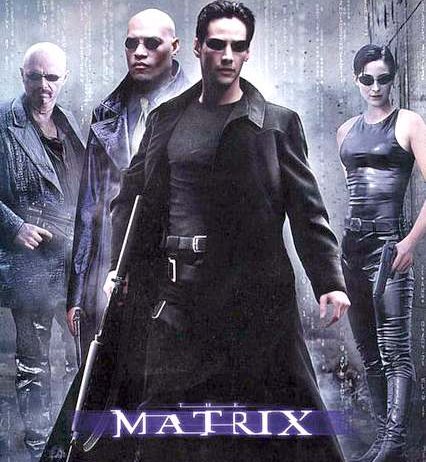
2. The Matrix (Trilogy)
An all time list of movies about hacking is never complete without including The Matrix. Its trilogy is a mainstream success, so I presume that you have seen at least one instalment or know something about The Matrix. But for those of you who are clueless, the film tells the story about a computer hacker known as Neo (Keanu Reeves) who learns from mysterious underground hackers about the real nature of his existence and his main role in the war against the controllers of it.


1. WarGames
WarGames is a film about a young hacker who unknowingly gains access to WOPR, a United States military supercomputer programmed to predict possible after-effects of nuclear war. He gets WOPR to run a nuclear war simulation, initially perceiving it to be a computer game, which caused a national nuclear missile scare and nearly initiates World War III.


If you would like to share your favorite movies about hackers or hacking, please do so via comment.